
Dear PantherExpress Users,
We're implementing a new system validation feature in the PantherExpress System to accelerate your purchase order processing and eliminate unnecessary delays.
What's Changing?
Starting March 30th, the PantherExpress System will check that a Distribution Method has been added before you can submit your requisition for approval. Each year, thousands of purchase orders were delayed due to not having this information.
When users reach the checkout step and click "Submit," the system will validate that all line items have a Distribution Method selected. If any lines are missing this information, you'll receive an error message and will need to:
- Click on the line item(s) that needs the Distribution Method
- Select the appropriate method in the Distribution section
- Return to checkout and submit
What is Distribution Method?
The Distribution Method determines how your supplier receives your purchase order:
- Email – Choose this option to send the PO to the entered email address
- cXML – PO is electronically transmitted to suppliers with integrated systems (automatically selected for enabled suppliers)
- Fax – PO is sent via fax to the fax # entered
- Manual – PO is not sent to the supplier
Please note the following:
- If all line items do not have the same Distribution Method, your requisition will automatically split into multiple purchase orders.
- This validation check will not apply to “New Supplier” orders or change requests
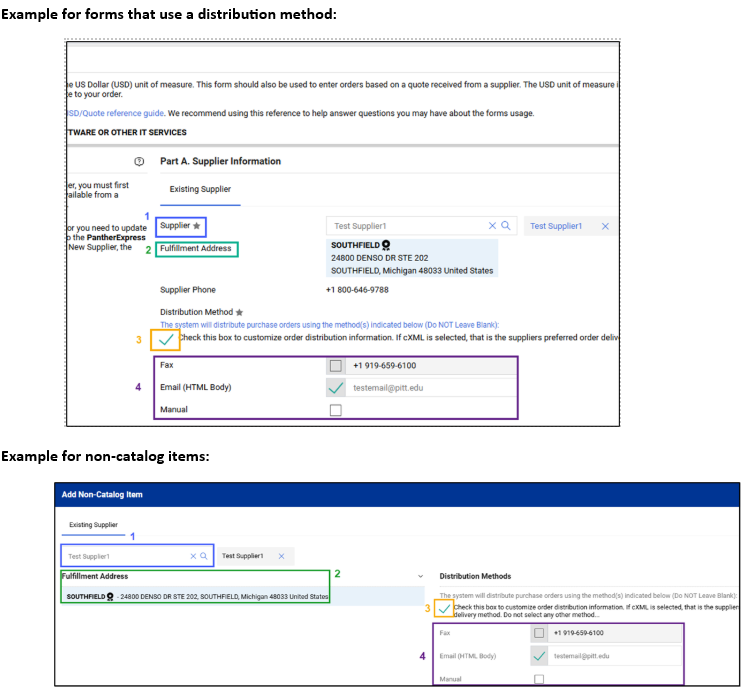
To Add a Distribution Method:
- Search for your supplier
- Confirm the fulfillment address. If there is more than one fulfillment address available for a supplier, you will see a pencil edit icon that enables you to view the available addresses. Note: Each fulfillment address may have its own distribution method.
- Click on the distribution check box to review the distribution method information.
- Any default method the supplier has for that address will auto-populate. If there is no default information, you will need to select and fill out a method.
Why This Benefits You
Currently, if the Distribution Method is left blank, your purchase order enters an administrative review queue where it can be delayed while back-and-forth communication takes place between a system administrator and a user. With this new validation, you'll know at checkout if the Distribution Method is missing and can correct it before submission.
Reducing Manual Selection: Default Distribution Methods
Many supplier profiles already have a default Distribution Method configured, which means you won't need to manually select it for every order. However, not all suppliers have this set up yet and each supplier address can have its own distribution method.
If you regularly order from a supplier who doesn't have a default method, you can submit a ticket with PPT Customer Service to add one to their profile. In the ticket, please specify if the distribution method is applicable to a specific address or would cover all addresses. Please note that for email distribution, we only add group email addresses (such as sales@supplier.com, info@supplier.com, or orders@supplier.com) rather than individual sales representative emails to ensure continuity.